Showing posts with label Apple. Show all posts

Saturday, March 31, 2012

Why Nokia is Microsoft's best bet

BACKGROUND
This year is truly going to be the battle of the OSes - Windows, OS X and iOS, and Android. Moreover, it's going to be a battle of ecosystems between two traditional rivals - Microsoft and Apple. With Apple launching Mountain Lion this summer and Windows 8 expected to come out in September-October this year, the race only gets more exciting. Windows 8 is also going to come in the tablet version and is said to be the real competitor to the iPad. The Lumia 900 is launching in the US on 8th April, and is expected to be a blockbuster launch.

I call it the war of ecosystems because the devices these companies make and the software they offer are so integrated into one another, that not having even of them would be like an incomplete jigsaw puzzle. From mainstream computer devices, tablets and phones, they are also competing in the space of cloud computing and entertainment devices. The integration offers a great unified user experience and it may essentially boil down to just this.

Taking about the Apple ecosystem, it recently announced its latest Desktop and Laptop OS 10.8 Mountain Lion, dropping the name it was synonymous with - the Mac. This indicating that there is now greater integration between iOS and OS X. With ML, Notification Centre, iMessage, Game Centre, Twitter Integration, Reminders and Notes - all iOS apps have now come to the OS 10.8. At the same time  iWork and iLife was ported into iOS. Apple offers the iPad as its tablet offering and iPhone as its mobile device. iTunes is the one stop hub for all media - songs, movies, TV shows, audio books, tones, books and mobile apps. Apple TV is Apple's entertainment device that allows you access iTunes content on a TV set. Not only that, with Airplay you can use it as a wireless projector for you Mac, iPad and iPhone. Binding it all is iCloud which keeps all content synced and up-to-date on all devices including iTunes purchased media. Apple also has Game Centre for those who love gaming on iOS. Many games are now on the Mac OS as well, making it a complete ecosystem.

Windows too has a great ecosystem offering as well. By adopting the Metro Tile interface across all devices, it has brought it uniformity. The new Windows 8 offers drastic UI changes for earlier versions of Windows. It is great to look and simple to use. Self updating tiles make your screen come to life. The Messages app now merges your MSN and Facebook contacts into one, and you can chat without even logging on into Facebook. Nokia Lumia is the perfect device to use the Windows 7.5 OS Mango. With great hardware and software, Nokia completes Windows on the phone and I will explain this later. Windows 8 has also specifically been designed keeping in mind the tablet market. Windows 8 will be great on a tablet device, and we just have to wait and watch for that. With the success of the XBOX, Microsoft had a perfect gaming device and with Zune, they are trying to get more media content on board to make XBOX not just about gaming but also entertainment. XBOX is now integrated into the 7.5 OS Mango and Windows 8. To top that, there is Skydrive which is the cloud offering of Microsoft and available on all devices. Skydrive is now built into Windows 8 and merges with Office. This again completes the Microsoft Windows ecosystem.

WHY IS NOKIA THE BEST BET FOR WINDOWS THEN?

The new OS 7.5 Mango is on phones manufactures by Nokia, HTC and Samsung. Samsung has been concentrating its core on using Android on its devices and giving it the push to take on Apple. They have not provided such a push for the Windows based phones, which seems like they already think Mango is inferior to Android. Moreover they are developing their own OS Bada. So in priority, they will push Windows last. As far as HTC is concerned, they too are now focussing on Android heavily. Not much push is given to the Mango OS. This means that lesser attention will be paid to these devices and if you buy them you may be stuck due to lack of services and native apps by these manufacturers (although HTC had HTC Sense).Nokia on the other hand, is empowering its devices with Windows OS and is thus able to put all its effort and resources behind it. They are not dealing with any other OS except Symbian but it is now clear that the Lumia range of phones is going to be its flagship for a long time to come.

With the Lumia 900 launching on 8th April in the US, massive preparations are underway by AT&T and Nokia. Infact the Head of Device at AT&TJeff Bradley has commented, "Before you walk into the store, you know this is our hero phone...At all levels, this is a notch above anything we’ve ever done." This means that AT&T is putting a lot into this, even more than it's best selling iPhone. They have never done or said such a thing for any Android device or even a Windows device made by HTC or Samsung. So I guess it's not so much about Windows as it is about Windows 7.5 on a Nokia Lumia. This is another reason why Windows can bet big on Nokia.

One of the reasons iOS is criticized is because of the lack of a native mapping and GPS device. Even the Windows OS doesn't have GPS, it has Maps. But Nokia completes it with Nokia Drive and Nokia Maps which is far better and extremely convenient to use. Its not only these but other apps as well made by Nokia that add to the Windows OS like Contacts Transfer, Network Setup, TuneIn Radio, CNN and TuneIn Radio. 

There was a time when your dealer would recommend a Nokia phone for you. Overtime that has changed and now the same dealer will tell you to go for Samsung. I realized that it is because the margins and commissions on those phones are more. But, if you're someone who is looking for Windows it should be the Lumia. If you're someone who is looking for an ecosystem and an integrative experience and you're a  Windows person, then Lumia is the perfect phone for you. It will not disappoint. The takeaway in all this is that now it's Microsoft's turn to talk about their products, their ecosystem and not leave it on Nokia alone to promote and market the Lumia Windows phone. When they want to promote their mobile devices, they should show Lumia as the frontrunner and also show how it fits into the entire ecosystem.

Sunday, March 11, 2012

iCloud v/s SkyDrive

One of the emerging technologies today is cloud computing. Earlier available to only big corporations, cloud computing is now available even to consumers for their files and docs. One of the early players was DropBox (which still stands out among the existing players), Apple's iCloud bought to the forefront cloud computing and how it can lead to perfect synchronization between devices. Launched last year, every individual who doesn't own an iPhone or iPad knows about iCloud, but little is known about a service called SkyDrive.


SkyDrive is Microsoft's cloud service for its users. Launched in 2007 as Windows Live Folders and available to a few testers, the service was then made available in 62 countries in 2008 and was renamed as Skydrive, with an initial 5GB of space. Every user now has a limit of 25GB. I only came to know of the service two weeks back when I first started using the Nokia Lumia 800 Windows Phone. I was searching to see if there was a cloud service that the Windows phone had when I stumbled upon SkyDrive. And I must say, I am very impressed by this offering. Just disappointed that I din't know of it earlier and it has never been a talking point that Microsoft has used or what Nokia can use. In this post, I am going to compare and contrast what i think is going to be a big battle: the battle between Microsoft and Apple for their respectives Phone OS, and their cloud service iCloud v/s SkyDrive.

SPACE
iCloud offers all users a minimum 5GB of space. It allows you to purchase additional space on the cloud. An additional 20GB comes for $40/year, while additional 50GB comes for $100/year. If you have multiple Apple devices and keep a backup of each of them on iCloud, then 5GB maybe less and you will have to purchase additional space. SkyDrive offers every user 25GB. As of  now its not expandable but it will be an option soon where Microsoft is believed to give unlimited space for documents and photos, and 25GB for everything else. You can't keep a backup of your Windows Phone on SkyDrive. This is a feature that SkyDrive should get.

ACCESSIBILITY
iCloud is now an integral part of iOS 5 and the new OS X Mountain Lion. Inbuilt into iOS 5, a user is expected to provide login details at the setup stage of the device or is free to create an account. It then syncs seamlessly with apps that support iCloud. With the new Mac OS, you can now browse files on the cloud on your MacBook Pro/Air or iMac without logging into iCloud.com . There is no facility as of now to drag and drop files like DropBox. You have to upload/download files through iCloud.com on a browser. iCloud is available on all Apple Devices, and through iCloud.com for those using a PC. SkyDrive on the other hand is available to all users who have a Windows Live ID. Not only can it be installed on a Windows Phone, but also on an Android and iPhone, making it available on all major phone platforms. You can access it anywhere by signing into you Live ID. While there was no support on Windows 7, hopefully Windows 8 will see some inbuilt SkyDrive features which can be a definite plus point for SkyDrive.

CONTACTS AND CALENDARS
iCloud offers seamless integration for your contacts and calendars. Updated on one device, contacts and calendar entries will be available on all devices - iPhone, iPad and Mac. Contacts and Calendars on your Windows Phone syncs will Hotmail. It will not readily show in Microsoft Outlook (not for me atleast). It would be a great plus point fot Microsoft to merge this with Microsoft Outlook and Address Book on Windows. One thing that happens on Windows Live is that your contacts also show your Facebook Friends and LinkedIn connections.

DOCS
On iCloud, you can upload Powerpoint and Keynote Presentations, Word and Pages docs, Numbers and Excel Sheets. These can be edited through the Pages, Keynote and Numbers apps (purchased apps) on the iPhone and iPad. Other than these, no other file formats are allowed. PDFs can be opened on iBooks but cannot be arranged into folders. Docs automatically show in these apps. SkyDrive is extremely flexible. You can create folders and upload files to them directly. Even PDFs can be uploaded and viewed. With Microsoft Office now inbuilt in Windows Phone OS 7.5, docs on SkyDrive can be viewed and edited on your phone. You can replicate your exact file and folder structure of your PC on SkyDrive and carry you docs with you right in your pocket with your Nokia Lumia Windows Phone. This is a great feature and I'm wondering why Microsoft hasn't publicized this yet. It's time Microsoft decided to take on better marketing and support its partners, especially Nokia which can make do with a great feature like this.

PHOTOS
On SkyDrive, you can upload your photo library and arrange them as per your preferences. This gives users the flexibility of keeping large albums online and accessing it anywhere. Photos clicked on your Windows Phone is not automatically added. This is where iCloud scores a brownie point. With Photo Stream, photos clicked on one device can be seen on all other devices. Earlier, you could not upload photos from your library onto the cloud. After launching the iPhoto app, you can create journals out of your photos and put them on iCloud. You can't directly upload them from your computer to iCloud. In that sense SkyDrive is better as it offers more flexibility.

MUSIC AND APPS
I'm afraid theres no comparison here. iTunes is the one stop shop for purchasing music, movies, TV shows and mobile apps. With iTunes Match, you can store all your purchases on the cloud and access it on all other Apple devices. The experience is just magical. Apple has merged iTunes and iCloud extremely well. The service though, comes at a small fee of $25/year. There is Zune Pass, which gives you access to all music for a fee. This is an area of development for Microsoft. With the XBOX which is now a entertainment device and not just for gaming, the Windows Phone and soon to come Windows tablet and Windows 8, there is a need to create an ecosystem something like what Apple has created with iTunes.

SHARING
The photo journals you now make on the iPhoto app and uploaded on iCloud can be shared with people of your choice. Documents on iCloud, however, is only visible to you and cannot be shared with anyone to view or edit. You can either mail a copy of your document or upload Keynote, Pages and Numbers docs to iwork.com to share with others on a view-only basis. Viewers can add notes or download the doc. On the other hand, docs on SkyDrive can be shared with anyone on a view-only or view and edit basis, making collaboration easier. You can also share photo albums with others. Sharing is easier on SkyDrive than iCloud.

Both iCloud and SkyDrive have different features that make it stand out. SkyDrive offers more flexibility but Apple's ability to simplify cloud and integrate it into the very backbone of the Apple ecosystem makes it easier to use and more accepted. Apple has used its prowess in marketing to make more people aware of  iCloud and how its used with Apple devices. Having said that, Microsoft too has a good service, they need to focus on making it more known and acceptable to the public. There is a need to simplify the UI, and greater integration into the Windows Phone and Windows ecosystem. SkyDrive provides a great rallying point for Nokia to promote its Lumia range of phones, because SkyDrive actually has the ability of transforming the smart phone to a PC in your pocket or what Windows phones were called earlier - 'Pocket PC'. Microsoft should recognize this and support its partners better to achieve seamless integration.


Monday, November 28, 2011

On my iPad...

There was a time when people used to ask you, "What's on your iPod?". Today that question has slighlty changed. Its now, "What's on your iPad?". Its now about the apps on your iPad and not the songs on your iPod. Also your iPad can also have songs and movies, so that's a given. Ever since I got my hands on iPad (and iPhone), I spend a good half hour everyday going through the app store, seeing what are the new apps, which are the apps worth having, which ones are free and which ones are paid etc. After about 6 months, I have finally reached the stage of sufficiency where I have all the apps I possibly need doing a whole new range of things. I now only go through new apps to see if there is anything worthwhile (mostly games) nowadays. Many have often asked me what are the good apps that one must have and what I suggest. So I thought I should pen down what I have and how I categorize them.


APPLE PRE-BUILT APPS
  1. Messages (iMessage Basically)
  2. Calendar 
  3. Notes
  4. Reminders
  5. Maps
  6. YouTube
  7. Videos
  8. Contacts
  9. Game Center
  10. iTunes (Only for Podcasts and iTunes U, otherwise doesn't work in India)
  11. App Store
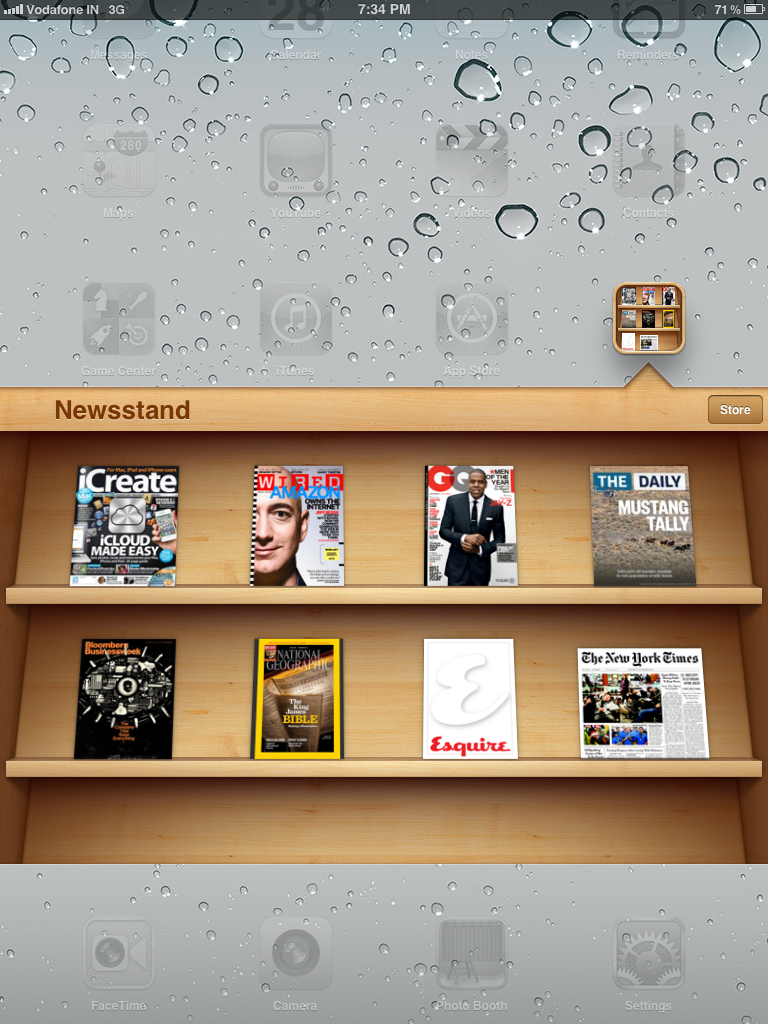
  12. Newsstand (for all my Magazine Subscriptions)
    • iCreate
    • Wired
    • GQ
    • The Daily
    • Bloomberg Businessweek
    • National Geographic
    • Esquire
    • The New York Times
  13. Camera
  14. FaceTime
  15. Photobooth
  16. Settings
  17. Safari
  18. Mail
  19. Photos
  20. Music
  21. Calculator HD (Same interface as the iPhone Calculator, third party paid app)
  22. Clock (third party paid app)
  23. iBooks (also reads and stores PDF Files)
FIND
  1. Find My iPhone (useful to track your Mac, iPad and iPhone on GPS. Also enable remote locking, remote wipe and beep. iCloud account needed. It's a must for any iPhone/iPad user)
  2. Find my Friends (GPS tracking for friends. You can also block your location)


iWORKS
  1. Numbers
  2. Pages
  3. Keynote
Used with iCloud. It can seamlessly sync all your files. Keynote is for presentations, Pages are for documents and Numbers is for spreadsheets. They open Microsoft Office Documents and are made my Apple. 


iLIFE
  1. iMovie (for editing and making movies)
  2. Garageband (for making your music. You can also play your instruments virtually on the iPad)
  3. Remote (Control your Apple TV or iTunes on your Mac with your iPad/iPhone)
These apps are made by Apple and are very good for creative people and just to fool around.

NEWS
  1. NDTV
  2. IBNLive
  3. TOI
  4. HT
  5. FirstPost
  6. BBC News
  7. CNN
  8. Pulse (configurable to what you want to read)
  9. ABC News (Great Interface)
  10. Mashable (if you want be update with what's happening in the digital world, then this is the app)
  11. Zite (only choose news topics you are interested in)


FINANCE
  1. Bloomberg (Great to keep track of your portfolio)
  2. Bloomberg TV+ (Watch Bloomberg Live on Your iPad)
  3. XE Currency (Currency Converter)
  4. powerone FE (Financial Calculator)
  5. CNBC RT
  6. FinConcepts (Financial Education App)
  7. Reuters MarketBoard
  8. WSJ Live

MAGAZINES (NOT ON NEWSSTAND)
  1. Economist
  2. HBR
  3. Foreign Policy
  4. Financial Planning
  5. Zinio (a parallel Newsstand with more magazines onboard)
  6. Engadget
  7. Archie
  8. Fortune
  9. Time
  10. Forbes Lists

PRODUCTIVITY
  1. DropBox (Good alternative to iCloud)
  2. PrintCentral Pro (Used it for Printing, now use an AirPrint Printer)
  3. DocsToGo (alternative to iWorks, iCloud makes this less convenient)
  4. Roambi
  5. Evernote
  6. Evernote Peak
  7. iMindMapMobile HD 
  8. Conference (Display a presentation from your iPad to other iOS devices over WiFi)
  9. SpeakIt (Converts text to voice)
  10. OmniGS
  11. Analytics HD (Configure Google Analytics Dashboard on this app)
  12. Fuze Meeting (Have a video conference along with presentations)

SOCIAL
  1. Facebook
  2. Twitter
  3. FlipBoard (One of the best apps. Configure your social networks and use it like a book. Many magazines can also be configured)
  4. Spout (Shows Facebook and Twitter feeds in an innovative way)
  5. StumbleUpon

IM
  1. Skype
  2. Fring (Have 4 way video chat)

EDUCATION
  1. TED
  2. Official GMAT
  3. GMAT Reasoning
  4. iHomeWork
  5. Architizer
  6. GMAT Club
  7. 7 Billion (by National Geographic)


INTERNET
  1. Google
  2. Downloader (used for downloading songs and videos directly on your iPad)
  3. Wikibot
  4. SpeedTest (test the speed of your internet connection)
  5. iSwifter (an internet browser which runs Flash)
  6. Wolfram Alpha (the brain behind Siri & a great search engine)

TRAVEL
  1. Flightboard (tells you flight timings Airport Wise)
  2. FlightTrack (Tracks flight realtime on GPS)
  3. Country Call (International STD Codes)
  4. Sygic (Turn-by-turn voice navigation and GPS for India)
  5. AllSubway HD (Subway Maps for cities around the world)


GAMES
  1. Infinity Blade
  2. Fruit Ninja HD
  3. FlightControl HD
  4. Sonic Racing
  5. Angry Birds
  6. Real Racing 2 HD
  7. Trade Nations
  8. X-Plane
  9. Bubble Ball
  10. Contract Killer
  11. Cut the Rope
  12. Scrabble
  13. Boggle
  14. Monopoly
  15. RoadTrip


UTILITIES
  1. AirPort Utility
  2. Dictionary
  3. PenUltimate
  4. BatteryMagic (an iPhone App)
  5. EZ Cam (use your iPhone camera wirelessly for the iPad)
  6. iNoteBook
  7. Weather

BOOKS
  1. Our Choice ( by Al Gore, a book in form of an app)
  2. Kindle
  3. TradePub (get free books from this app which will open on iBooks)

CARS
  1. Mercedes Quartets
  2. Mercedes Magazine
  3. Ferrari HD (a book on the history of Ferrari in HD)
  4. Porsche Pad Cinema (all Porsche Videos)
  5. Rolls Royce Phantom (an interactive app where you can customize your own virtual Phantom)


ENTERTAINMENT
  1. IMDb
  2. VLC (to play videos in other formats)
  3. Brushes (use your fingers to paint)
  4. djay
  5. Star Walk
  6. Epicurious (for cooking)
  7. Groove Bug (for Music)
  8. Phoster (design your own poster)
  9. TuneIn Radio
  10. Jango Radio


This is how all the apps are categorized on my iPad. I am using iOS 5 so Notification Center is a boon. iCloud integrates my documents, contacts, calendars, app data and photos seamlessly. These are the apps I think are sufficient to make your iPad good for anything. Do let me know if you have more to add to this. 


Wednesday, October 26, 2011

Steve Jobs, Apple and India

The much awaited Biography of Steve Jobs was finally released almost two and a half weeks after he passed. Written by Walter Isaacson, the biography goes into Steve Job's life and times. The book gives us great insight into the life of one of the best inventors, who was otherwise a very secretive and private person. One of the major influences in Steve Job's life has been India, religion and mysticism.

Steve Jobs came to India in 1974 and stayed here for 7 months in search of enlightenment. He landed in Delhi, and was put up in a hotel where his taxi driver got a commission for taking guests there. He was also welcomed with dysentry, thanks to the rather clean water that the hotel gave him. It took him a long time to recover and he went to Haridwar for the Kumbh. He participated in the Kumbh and went to Nainital to meet Neem Karoli Baba (Maharaj Ji). By the time Steve had reached Nainital, Maharaji ji has passed, or rather reincarnated. A local family hosted Steve and helped him recuperate. During  his stay, he repeatedly read the 'Autobiography of a Yogi' by Paramhansa Yogananda (It is believed that this is the only book he has downloaded on his iPad 2) and visited many villages. He also went to meet a Guru who shaved his head to save his health.

It is not known whether Steve returned enlightened or disillusioned. Isaacson's book says he returned more clear and learnt that not only are Indians rational but also intuitive. It was this trait - intuitiveness - that Steve tried to incorporate in all his products, making them the best in the world. Another view is that he went back to the States and said there was no enlightenment when more than half the country was so poor and miserable.

Either ways, the perception he had is not uncommon. Most of the West thinks of India as a country full of mysticism and spiritual gurus who can make all problems vanish. They think people in India still travel on Elephants and snakes happily roam the streets. They think all the people are poor and can hardly afford clothes hence they dress up like Gandhi (thats what someone in UK told me, and I was surprised at his ignorance and arrogance)  Many are shocked to see the level of English that we speak, perhaps even better than their's. Those who know of India only know the Taj Mahal or Goa. While this perception is changing rapidly, it is still the majority view in the West.

Steve went back and opened what would be one of the most valuable companies in the world. He launched game changing products, that changed the world each time around. He never returned to India, and perhaps never thought too highly of India as a market. It seems like the image of poverty still lingered and he thought Indians could not afford to buy an Apple product.

Apple has never treated India as an upcoming market. It launched the iPad and iPhone 4 a year after it released. It has often treated India as a dumping ground for older products when they were launching upgraded versions of the same. To add to that, Apple has officially sold roughly 21,000 iPads and iPhone 4 s respectively. This is hardly anything compared to the sales they make the world over. This is perhaps why Apple doesn't treat India as an upcoming market. There is no Apple Store in India, only resellers. But here's the flip side - the number of these devices being used is almost 5 times the number Apple has officially sold, thanks to the Grey Market. These products are available in India so late that those who want them buy them from elsewhere, and pay prices that are unimaginable. I know someone who paid 82,000 for a 64GB iPhone 4S.

There's no doubt that Indians can afford Apple Products. There are 33 million people in India who can afford to buy an Apple iPhone, iPad or MacBook. However the number of Apple Products in the market is very insignificant. The reason is that the choice is a lot and competitors like Samsung and Nokia and more visible and do more promotional efforts. Apple Products are more aspirational in nature, which everyone wants to own (and they may own one, one day). There are more than 800 million mobile subscribers in India. We're growing at a rate that will surpass China. We are as much a market as China is. More and more people are switching to smart phones. Apple can capture the market and gain significant market share. A good market share in India will only add to the iOS and Mac OS X ecosystem the world over, making it more prominent and dominant.

If Steve Jobs had to come to India today, he would be amazed to see the blend of spirituality, economy and technological development that makes this nation magical (and I mean it when I say magical - somehow things just happen like magic). We're an upcoming economy and our negatives now will turn out to be our positives in a decade or two (population). We are Apple's market, we are a defining part of Apple's future. We are an upcoming superpower, and a super company should take an upcoming superpower seriously.


Saturday, October 22, 2011

Top 7 iPhone 4/4S Cases

The innumerous leaks of iPhone 5 cases led the whole world to believe that Apple would release the iPhone 5 earlier this month. As tech enthusiasts eagerly followed the Apple Event on 4th October, the excitement soon turned into disappointment with the launch of the iPhone 4S. To look at it, it was only logical that Apple would launch 4S given 3G and 3GS. While externally it may look the same, the interiors are completely different, and its features along with iCloud, iOS 5 and Siri make it the best phone in the market for a long time till competitors try and match up to a magical device - the iPhone 4S.

Most cases that fit the iPhone 4 will also fit the 4S. Here is a list of what I think are the 8 best cases which offer either looks or protection, or both of them.

1. CLEAVE ALUMINIUM BUMPER CASE
Made of Aluminum and available in different colors (black, grey, silver, purple, pink), The Cleave Bumper is by far the coolest I have seen. It gives a metallic touch to your phone and offers complete protection to the metallic strip on the iPhone. It is intricately designed and has special metallic buttons for the On/Off, Volume Control and the Vibrate button. It is a little difficult to put on as it has two screws and by putting the case you will not be able to use your phone on the docks and music systems which require iPhone docking. This case will also burn a deep hole in your pocket costing close to $150. 

2. CAPDASE SMART POCKET CASE
For those who want the use the iPhone the way it is without bumpers and cases, but prefer to have some protection when not using it, this is the perfect case. Made of leather and available in Black, Chocolate Brown, White and Red, this case adds class to an already classy phone. There is a small open slot between the metallic clip which lets you see who's calling. It also has a small flap at the back which you can pull for the phone to pop out.This case is relatively not too heavy on your pocket and is available for Rs.799

3.  THE iPHONE BUMPERS
The Antennagate issue brought the Bumpers to the forefront as a method of reducing signal drops. Apple distributed these bumpers free of cost for the first few months when the iPhone 4 went on sale. They are now available for $30 and are nothing more than an accessory to decorate your phone. With six colors, you can change the bumper to suite your mood.

4. INCIPIO FEATHER CASE
Incipio makes some the best cases for Apple Devices including the iPad, iPhone and the MacBook range of laptops. The Incipio Feather case shell is incredibly thin and lite. It adds no weight or bulk to your phone maintaining a sleek and classy look while providing the right amount of protectio. The feather case comes in a host of colors. Two of these come in a set for $39.99. 

5. INCIPIO EDGE PRO
Coming in a range of colors that is bound to grab eyeballs, the Edge Pro Cases by Incipio offer the looks and the protection for your phone while giving access to all buttons and ports. It has two pieces, and lower piece easily slides away making it easy to use the iPhone on docking systems. 

6. OTTERBOX DEFENDER SERIES
The Otterbox Defender Case is the ultimate when it comes to providing full blown protection to your iPhone. There is a hard solid casing that covers the entire phone leaving only the screen open for the user. You can drop you Phone and be rest assured that nothing will happen to your phone. Ideally nothing should happen. The case adds bulk to your phone and in the pocket and spoils the look of the iPhone .

7. SCOSCHE KICKBACK HYBRID CASE
The polycarbonate and rubber hybrid case provide complete protection for the iPhone froms accidental drops and scratches that may occur during general usage. The Case also has an inbuilt stand that can be used while watching videos or during a FaceTime Call. The case comes in two colors - white and black. 

These are some of the best cases I have come across. if you seen anymore, please do let me know so I can check it out.